The Problem
Evisort is a contract lifecycle management platform. Its customers are legal teams at mid-to-large organizations: general counsel, legal operations managers, contract managers, and legal analysts. These teams manage thousands to tens of thousands of active legal agreements at any given time.
Every legal agreement is built from clauses: discrete provisions that define rights, obligations, and conditions. An average agreement contains about twenty clause types (indemnification, governing law, termination, confidentiality, and so on). Across a portfolio of thousands of agreements, the same clause type will appear in hundreds of variations, negotiated differently across different counterparties, time periods, and business contexts.
This creates a serious information integrity problem. When a general counsel asks "how many of our vendor MSAs use our standard indemnification language, and what are the variations for those that don't," the answer requires a legal operations person to manually locate every in-force MSA, read the indemnification clause in each one, and compare the language. That process is slow, error-prone, and practically impossible at scale.


Our two primary personas for Clause Library
Evisort's opportunity was to solve this with AI: automatically analyze an organization's existing contracts, identify the clause types they contain, and organize the clause language into a managed library that legal teams could search, standardize against, and use to construct new agreements.
The challenge was that no one had ever shipped a clause library feature that users actually adopted. Internal subject matter experts told us they had never seen one successfully implemented. Users historically defaulted to Word documents and Excel spreadsheets.
How We Worked
The project ran for 6 months from inception to release. The team was small: me (researcher and design strategist), a product manager, a visual designer, and a developer who was not fully allocated to the project.
I served as the design strategist and researcher throughout: I created the low-fidelity sketches, user journeys, flows, and information architecture. The visual designer translated these into medium- and high-fidelity screens. The product manager ran sprint logistics.
We structured the work as a series of iterative design sprints, each ending with usability testing against real users of the existing MVP. The cadence was: design, test, learn, redesign. We ran three full sprint cycles between February and May, with a discovery sprint in December that preceded the design work.

How we worked and my contributions
The How Might We statement that framed the project:
How might we provide legal counsel and legal operations contributors with a way to organize and standardize their clause language in a single place, define when and in what situations different clause versions should be used, use the standardized language to construct legal agreements, update or retire clause language as needed, and track clause language usage, so that time-to-agreement and use of non-standard clause language can be decreased?
The Hard Part: Users Couldn't See What the AI Was Doing
The discovery sprint in December surfaced the core problem early. We spoke with internal subject matter experts (customer success, legal ops consultants) and confirmed several things: the primary personas were legal counsel and legal ops people. They needed better clause language management. Manually populating a clause library was too much friction. We needed to provide bulk upload and AI-assisted clause identification.
But the discovery sprint also surfaced what we didn't know. We didn't know whether users would understand an AI-based approach to analyzing their agreements and identifying clause types, use cases, and language variations. We didn't know whether they could easily learn to configure clause language in the UI. And we didn't know what bulk upload capabilities they expected.
The first design sprint (February) confirmed the fear. We tested sketchy wireframes with four MVP users. They understood the basic information architecture. They could navigate the clause library structure. But when we showed them the "AI Suggest" feature, which would analyze their existing contracts to identify and extract clause language automatically, they hit a wall.

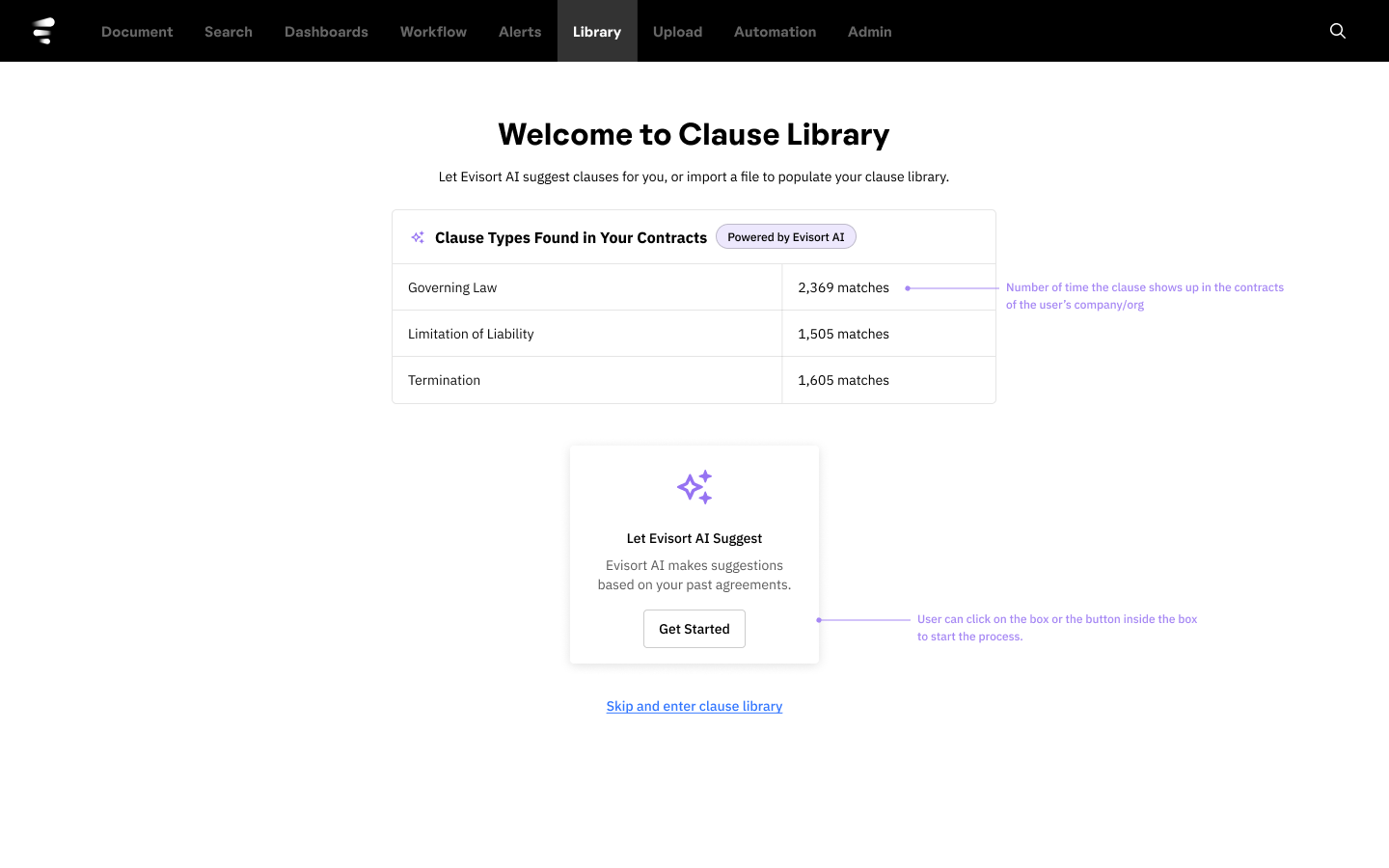
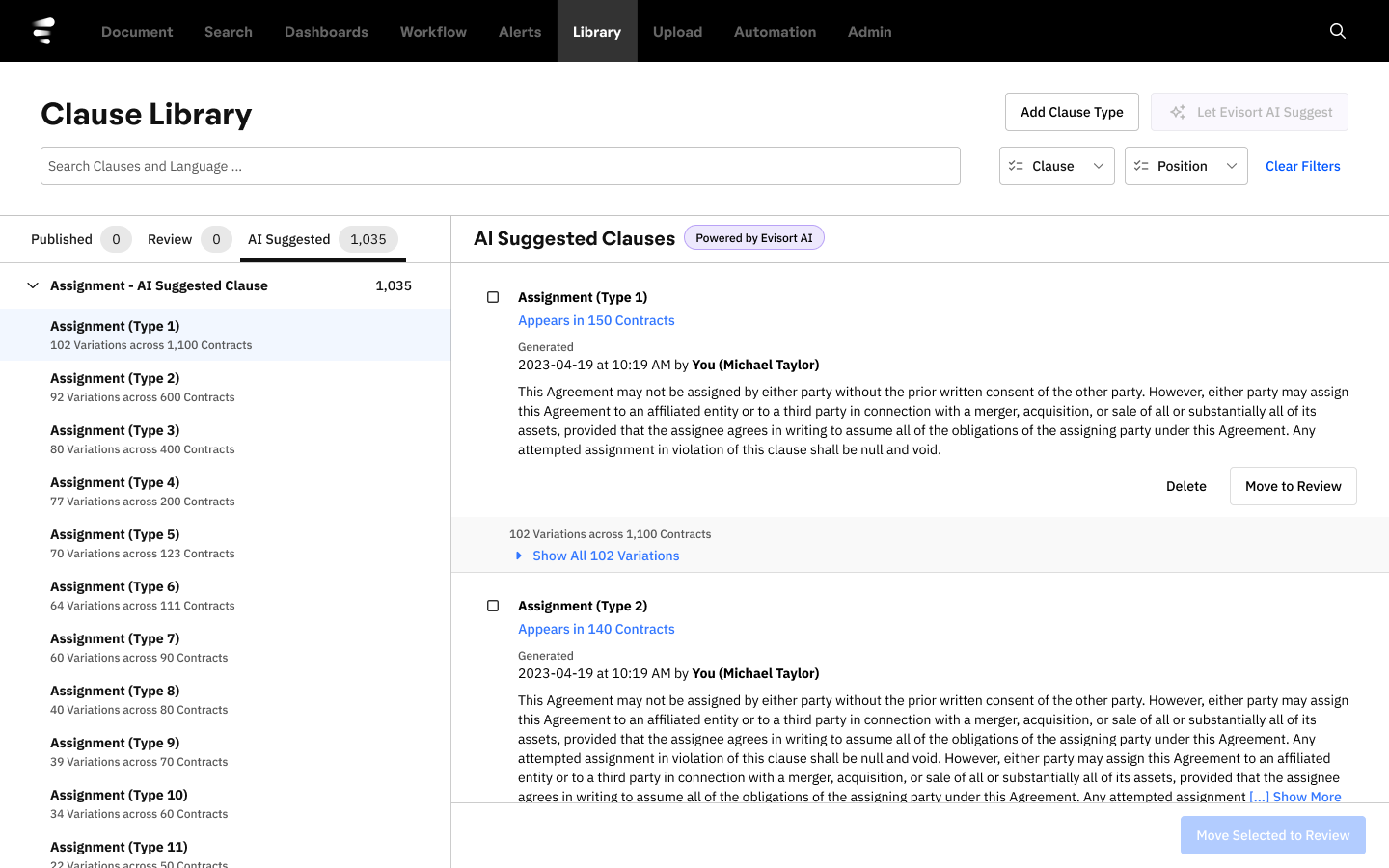
Early wireframes. Users couldn't understand what the feature was doing with their contracts and contract language.
Users could not build a mental model of what the AI was doing. They understood that something was happening. They could see results. But they couldn't answer basic questions: What contracts did the AI analyze? How did it decide what counted as a clause? Why did it categorize this language as "Governing Law" versus "Jurisdiction"? Where did this suggested language come from?
This is the same problem my PhD dissertation investigated in a different domain. When pilots interact with automated flight systems, performance degrades when they can't build an accurate model of what the automation is doing and when to trust its outputs. The Evisort users were experiencing the same breakdown: the AI was a black box, and without a legible model of its behavior, they couldn't trust or effectively use its suggestions.
Three Sprints, Three Breakthroughs
Sprint 1: Validating the Structure (February)
The first sprint focused on the foundational UX: information architecture, the main user flow, and initial UI sketches. We tested low-fidelity wireframes with four MVP users.
What worked: the tab-based navigation made sense. The clause configuration panel on the right side was recognizable. Users could mentally map the structure to tools they already knew.
What didn't work: the AI Suggest feature was opaque. Users wanted to bulk-populate their library (one participant estimated it would take her three weeks of dedicated time to do it manually) but they couldn't understand what the AI would do or how.
Tom A., Director of Legal Ops"I think this is very easy to use. It would make our legal team comfortable. But importing an existing document should be made easy."
Kristi, Legal Analyst"It would take me a year if you told me to build a clause library with our current playbook."
Sprint 2: Making the AI's Actions Understandable (March)
The second sprint focused directly on the AI trust problem. We redesigned the AI Suggest flow to show users more about what the AI had found, tested with five MVP users, and also tested the document upload flow.
Progress was real but incomplete. Users could work through the AI Suggest flow, and the display of clause language was improving. But the fundamental mental model mismatch persisted: they still weren't sure what the AI was doing and why.
This sprint also surfaced two important new requirements. First, users needed an approval workflow. If person A uploads clauses but person B owns all legal language, there needed to be a "needs review and approval" step before anything got published. Second, users wanted control over which contracts the AI analyzed: the ability to specify date ranges or contract types so the AI wouldn't surface language from outdated or irrelevant agreements.
Jordan, General Counsel"You should show where this information came from."
Colby, General Counsel"I should be able to specify which agreements are evaluated by the AI. Like I want to leave out agreements before X years ago, or leave out all third-party contracts."
Sprint 3: Resolution (April-May)
The third sprint brought the major refinements that resolved the AI trust problem. We made several key design changes.
We simplified the view of identical clauses so users could see at a glance how many variations existed and access all matching language. We added secondary labeling that explained what clause language was contained in each element and how often it occurred across contracts. We added a "needs review before publishing" area that prevented inadvertent publication of AI-suggested language. We refocused the first-time experience on Word document upload (the familiar action) while keeping AI Suggest as a secondary option. And we implemented tabs and flat navigation that could support traversal of thousands of clauses without performance or usability degradation.
The result was that users could now see what the AI had analyzed, understand how it categorized clause language, verify the suggestions against their own knowledge, and approve or reject suggestions before anything went live. The AI's reasoning was legible. Trust was calibrated. The black box was open.
Outcomes
After the last round of user testing and design revisions, we shipped Clause Library, resulting in a 91% increase in dashboard and document views. Clause Library had found its audience.
What I Learned
Discovery sprints work, but they're challenging to organize. Everyone has to step away from their day job. Providing sprint training inline (learning then immediately applying) proved more effective than upfront training sessions.
Some amount of chaos is inevitable when executives are adding input, user stories are being refined concurrently, and technical constraints are surfacing in real time. The key is flexibility with structure: we ran three check-ins per week, weekly executive reviews, and design reviews on the fly, mixing pair design with solo design as the situation demanded.
Moving fast has a quality all its own. The techniques that enabled our velocity: staying low-fidelity as long as possible, actively seeking out stakeholder scrutiny rather than avoiding it, and keeping the extended team aligned with regular communication.